
Change transforms
Signals which quantify how time series change over time.
signal.change()
signal.change()signal.change(*, method='auto', relative_to=None, limit, days, weeks, months, years)Calculate the absolute difference between the signal’s value and the value at a prior date. The
prior date is determined by an offset specified in years, months, weeks or days.
The method argument specifies how we find the prior data point to subtract.
When the method argument is:
'ffill'we forward fill the prior data a maximum oflimitdays to match
the dates.'bfill'we backfill the prior data a maximum oflimitdays to match the dates.'nearest'we move the prior data forward or backward a maximum oflimitdays
to match the dates. We match with the prior data point which is moved the shortest.Nonewe do not move the past data at all.
When the method argument is 'auto' we select the method and limit based on the
given offset (unless they are explicitly set). The method and limit is:
'nearest'and 31 days if the offset is more than or equal to 3 months'nearest'and 10 days if the offset is between 1 and 3 months'ffill'and 10 days if the offset is less than 1 month
These defaults are chosen because forward filling is more suitable when calculating the
short-windowed change in, for example, the close price, while the lenient matching of the
'nearest' method is more suitable for less frequent data like quarterly data.
- Parameters:
method– The method to use when matching with past data points, either
'auto'(default),'nearest','ffill'/'pad','bfill'/'backfill'
orNone.relative_to– An optional signal to use for the values at the prior date.limit– The limit on how far the matching method can move the data points.days– The number of days between current and prior period, for exampledays=1.weeks– The number of weeks, for exampleweeks=3.months– The number of months, for examplemonths=12.years– The number of years, for exampleyears=1.
Example
To get the day-over-day change in closing share prices:
close_price.change(days=1)Note that forward filling with a limit of 10 days is the default for such short offsets, so the
value on a Monday will be the change against the price on the previous Friday.
signal.relative_change()
signal.relative_change()signal.relative_change(method='auto', relative_to=None, limit, days, weeks, months, years)Calculate the relative change between the signal’s value and the value at a prior date.
The relative change is calculated as:
(current_value / prior_value) - 1The prior date is determined by an offset in years, months, weeks or days.
See the above signal.change(...) documentation for an explanation of the method and
limit arguments.
- Parameters:
method– The method to use when matching with past data points, either
'auto'(default),'nearest','ffill'/'pad',
'bfill'/'backfill'orNone.relative_to– An optional signal to use for the values at the prior date.limit– The limit on how far the matching method can move the data points.days– The number of days between current and prior period, for exampledays=1.weeks– The number of weeks, for exampleweeks=3.months– The number of months, for examplemonths=12.years– The number of years, for exampleyears=1.
Examples
To calculate YoY relative change on Visible Alpha reported total revenue:
va_actual('Total revenue').relative_change(years=1)To calculate YoY predictions for a KPI model (substitute your own model ID) that predicts Visible
Alpha total revenue:
kpi_predictions(model=123).relative_change(relative_to=va_actual('Total revenue'), years=1)Note that without specifying relative_to, the YoY relative change would be calculated versus model
predictions from the year before, rather than versus the actual reported revenue.
signal.yoy_holidays()
signal.yoy_holidays()signal.yoy_holidays(country, window, years=1, *, min_periods=1, min_denominator=1e-6)Calculate the year-over-year ratio for a signal, adjusted for holidays.
Note that this returns a ratio, so a value of 1.1 represents a 10% increase. You should subtract
1 to get the year-over-year change.
The year-over-year ratios are calculated by calculating a moving average whose length is given
by the argument window, and dividing it by the corresponding moving average from last year.
However, some modifications are applied to the data in order to account for the effects of
movable holidays. That is, if the moving average window this year contains, say, Black Friday,
the corresponding moving average window for last year is adjusted so that it, too, contains
Black Friday.
Currently, only the holidays for the United States and Norway are supported. The days that are
treated as holidays for the United States are all the federal holidays in addition to Black
Friday and Cyber Monday.
- Parameters:
country– The country whose calendar should be used to determine holidays. Currently only
USandNOare supported.window– The number of days in the moving window when calculating the moving average. This
can be 1 or any integer divisible by 7. The default is 1.years– The number of years between the window used in the numerator and the denominatormin_periods– The minimum number of non-NaN values present (in each of the numerator and
denominator) required. If there are fewer non-NaN values than this, NaN is produced.min_denominator– Produce NaN if the sum of the values in the denominator is smaller than
this.
Example
To get the year-over-year change in a signal with a seven-day moving average window:
signal.yoy_holidays(country='US', window=7) - 1signal.agg_change()
signal.agg_change()signal.agg_change(freq, method, *, upsample_daily=False, min_points=1, last_period_days=None, last_period_fraction=None, allow_partial_start=False, allow_partial_end=False, weeks=None, months=None, years=None, fiscal_entity=None)signal.agg_relative_change()
signal.agg_relative_change()signal.agg_relative_change(freq, method, *, upsample_daily=False, min_points=1, last_period_days=None, last_period_fraction=None, allow_partial_start=False, allow_partial_end=False, weeks=None, months=None, years=None, fiscal_entity=None)Aggregate a high-frequency signal to a given frequency, then calculate absolute or relative
change.
By default, sequential change is calculated. Sequential change is change since the last
equivalent period, which for a quarterly frequency corresponds to quarter-over-quarter change
and for an annual frequency corresponds to year-over-year change. Change may optionally be
calculated relative to a period that is a multiple of the frequency in the past. Use the
arguments weeks, months and years to control this. For example, to aggregate data to
a quarterly frequency and then calculate year-over-year change, use freq='Q' and
years=1.
The last period typically has partial data (only data in the beginning of the period) and there
are different ways of handling this period:
- Do not include the period in change calculation. This is the default behavior.
- Period-to-date calculation. Specifying
last_period_daysorlast_period_fraction
enables period-to-date calculation. When doing period-to-date calculation, the change for the
last period is calculated by determining the fraction of days for which there is data in the
last period and comparing it to the same fraction of days in the comparable period. The
min_pointsconstraint does not apply to the last period and its comparable period when
doing period-to-date calculation. - Normal change calculation. Setting
allow_partial_end=Trueenables normal change calculation
for the last period with partial data. The last period is then subject to themin_points
constraint as any other period.
If upsample_daily is set to True, the underlying signal is upsampled to daily frequency
before downsampling to the desired frequency. If the method is sum or mean_times_days,
the upsample operation uses divide=True. If the frequency of the underlying time series is
not detected, it is assumed that the time series already has daily resolution, and it is not
altered before the downsampling.
Note that if the frequency of the original data does not evenly divide the frequency being
converted to, (e.g. weekly data converted to quarterly) it is recommended to set
upsample_daily=True.
Whenever weekly, monthly or quarterly data is converted to fiscal frequencies ('FQ' or
'FQ/FS' or 'FY') it is also recommended to set upsample_daily=True, as any calendar
period may cross two fiscal periods.
- Parameters:
freq– A frequency, for exampleMorFQ.method– Method to use for aggregation. Standard Pandas methods like'mean',
'median','sum'are supported, as well as the special'mean_times_days'method.upsample_daily– Whether to upsample the data to daily resolution before downsampling.min_points– Minimum number of points needed in order to calculate an aggregated value for
a period. Note that ifupsample_daily=True, the data points are counted after the
upsampling, so the requirement applies to the number of daily data points.last_period_days– Day threshold for enabling period-to-date calculation for the last
period with partial data. If specified, the number of days from the period start to the last
non-NaN data point must be equal to or greater than the specified value. It is only allowed
to specify one oflast_period_daysandlast_period_fraction.last_period_fraction– Fraction threshold for enabling period-to-date calculation for the
last period with partial data. If specified, the fraction of days, calculated as the number
of days from the period start to the last non-NaN data point, divided by the total number of
days in the period, must be equal to or greater than the specified value. It is only allowed
to specify one oflast_period_daysandlast_period_fraction.allow_partial_start– Whether to include a period with partial data at the start of the
period in the change calculation. A period has partial data at the start of the period if
there are no non-NaN data points on or before the period start date.allow_partial_end– Whether to include a period with partial data at the end of the period
in the change calculation. A period has partial data at the end of the period if there are
no non-NaN data points on or after the period end date. It is not allowed to set this to
True iflast_period_daysorlast_period_fractionis not None.weeks– The number of weeks to determine the change offset.months– The number of months to determine the change offset.years– The number of years to determine the change offset.fiscal_entity– The entity whose calendar should be used to determine the fiscal periods.
Only relevant iffreqis a fiscal frequency. By default, the calendar of the evaluation
entity is used.
Examples
To sum up a signal to fiscal quarters and calculate quarter-over-quarter absolute change, use:
signal.agg_change('FQ', 'sum')To upsample a signal to daily resolution and sum it up to fiscal quarters or semi-annual periods and
calculate the year-over-year relative change, use:
signal.agg_relative_change('FQ/FS', 'sum', years=1, upsample_daily=True)To sum up a signal to forced fiscal quarters and calculate quarter-over-quarter relative change,
where we require at least 70 days with data in each quarter and data for the first 15 days in the
last partial quarter, use:
signal.agg_relative_change('FQ+', 'sum', min_points=70, last_period_days=15)To take the monthly sum and calculate month-over-month relative change, where we require data for at
least half of the last month, use:
signal.agg_relative_change('M', 'sum', last_period_fraction=0.5)To take the weekly sum and calculate week-over-week relative change, allowing a partial start and
partial end, use:
signal.agg_relative_change('W', 'sum', allow_partial_start=True, allow_partial_end=True)signal.change_relative_to()
signal.change_relative_to()signal.change_relative_to(from_signal, periods, pre_extend_months, shift_offset_days, shift_offset_months, shift_offset_tolerance_days, relative_change)Calculate the change of one signal relative to the past values of another signal.
Note: this signal is deprecated, use signal.change(...) or signal.relative_change(...)
with the relative_to argument instead.
There are two ways of calculating the change:
- Using the
periodsargument: Thefrom_signalis re-indexed to the index ofsignal
and the values are shifted by the given number of periods before the change is calculated. - Using the
shift_offset_days/shift_offset_monthsarguments: The index of the
from_signalis shifted by the given offset and then re-indexed to the index ofsignal
usingmethod='nearest'to match the nearest value.shift_offset_tolerance_days
specifies the maximum number of days a value can be moved when determining the nearest value.
If there are two data points in thefrom_signalwith the same distance to a data point in
signal, the newest one will be used.
Note that for signals that may produce time series with missing values, it is preferable to use
shift_offset_days/shift_offset_months. This method takes into account the absolute
number of days a value can be shifted, whereas the periods method will blindly shift values.
All arguments except for signal are optional. If no other arguments than signal are
given, periods will be used with a default value of 1.
- Parameters:
from_signal– The signal to calculate the relative change from.periods– The number of periods to shift thefrom_signal. The default value is
None.pre_extend_months– Ifperiodsis used, this specifies the number of months to
pre-extend the signal evaluation period. The default value isNone.shift_offset_days– The number of days to shiftfrom_signal. The default value is
None.shift_offset_months– The number of months to shiftfrom_signal. The default value is
None.shift_offset_tolerance_days– Ifshift_offset_days/shift_offset_monthsis used,
this specifies the maximum number of days a value can be moved when determining the nearest
value. The default value is31.relative_change– Whether to calculate the relative change. Set toTrueto calculate
relative change andFalseto calculate actual change. The default value isTrue.
Example
Calculate the year-over-year relative change in sales:
fs_actual('sales').change_relative_to(fs_actual('sales'), shift_offset_months=12)signal.cagr()
signal.cagr()signal.cagr(years, months, weeks, days)Calculate the CAGR (compound annual growth rate) of the signal, over the given interval.
Exactly one of the arguments years, months, weeks and days should be provided,
and it must be a positive integer.
The CAGR of a time series S, calculated over an interval from
t0 to t1, is calculated as
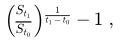
where t1- t0 is measured in years.
If the difference between t0 and t1 is one year, this is the same as
the year-on-year relative change.
Example
Calculate the CAGR of FactSet sales over the last 5 years:
fs_actual('sales').cagr(years=5)Updated 5 months ago